

Account settings
Updated this month
In this article
The account settings section allows you to manage your personal details, security, and regional preferences. Correctly filled-in details make communication with support easier and streamline collaboration within your projects.
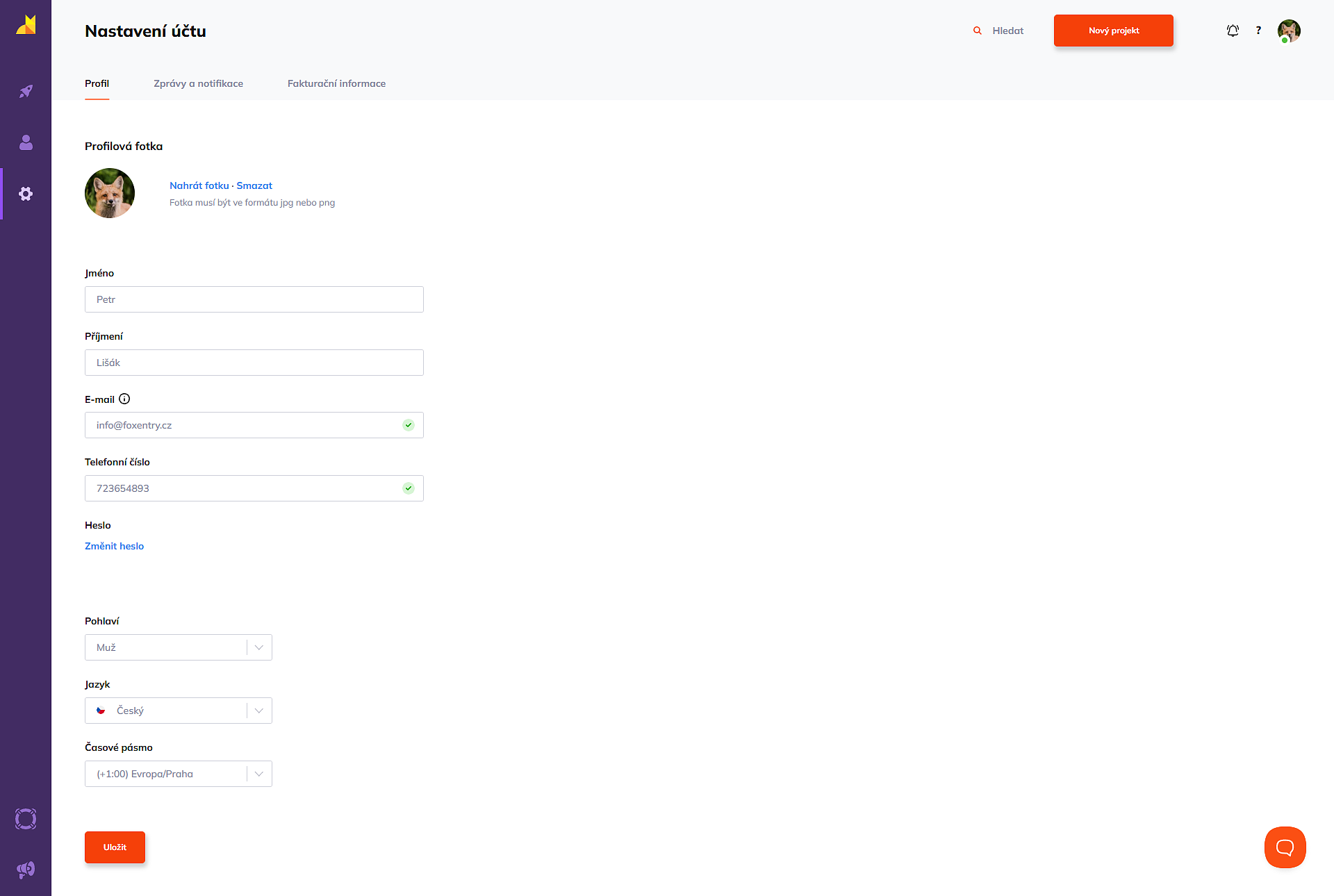
Personal details and profile
In the Profile tab, you'll find basic identification details that you can update at any time:
- Profile picture: lets you upload your own image or avatar for better orientation within the team,
- First and last name: your name, which will be displayed to other team members,
- Contact details: your login e-mail and phone number,
- Password: clicking the link opens a field right below it where you can enter your old and new password.
Regional and language settings
To make working in the administration as comfortable as possible, you can adjust its behavior according to your preferences:
- Gender: this information is used for the correct form of address in communication with the system,
- Language: switches the language of the entire administration user interface,
- Time zone: setting the correct time zone is essential for the accurate display of statistics and logs of your requests.
Don't forget to save
After making any changes to your profile, you need to click the orange Save button in the bottom-left corner. Otherwise, the changes will not take effect and will be lost when you leave the page.
Further settings options
In the top menu, you'll also find other important sections, which we cover in separate articles:
- Messages and notifications: setting up e-mail addresses for billing and technical messages,
- Billing information: managing company details for generating tax documents.
